A Definitive Guide to All Types of Laundromat Software
If you own or manage a laundromat, you need a way to take money from customers and, if you offer a wash-dry-fold, a way to run the work your staff performs. Those are two different jobs, and confusing them is the most expensive mistake in this category.
This article explains what laundromat software is, the types available, the hardware and software features on the market today, and what to look for before you take a sales call.
What Is Laundromat Software?
Start with the basics. Laundromat software falls into two categories that solve entirely separate problems.
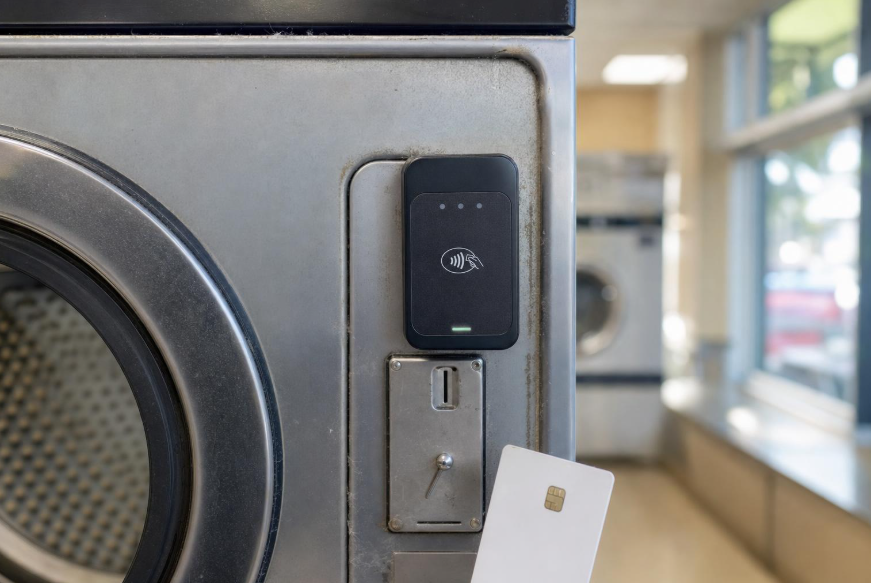
Self-serve payment systems exist because a machine will not start until it has been paid for. Everything in this category descends from the coin slot. The reader, the app, the account balance and the kiosk are all answers to one question, which is how a customer authorizes a wash without an employee involved. What the operator gets out of it is a second thing entirely: a record of which machine earned what, and the ability to change a price without walking the floor. The laundry itself is never touched by the software or by your staff.
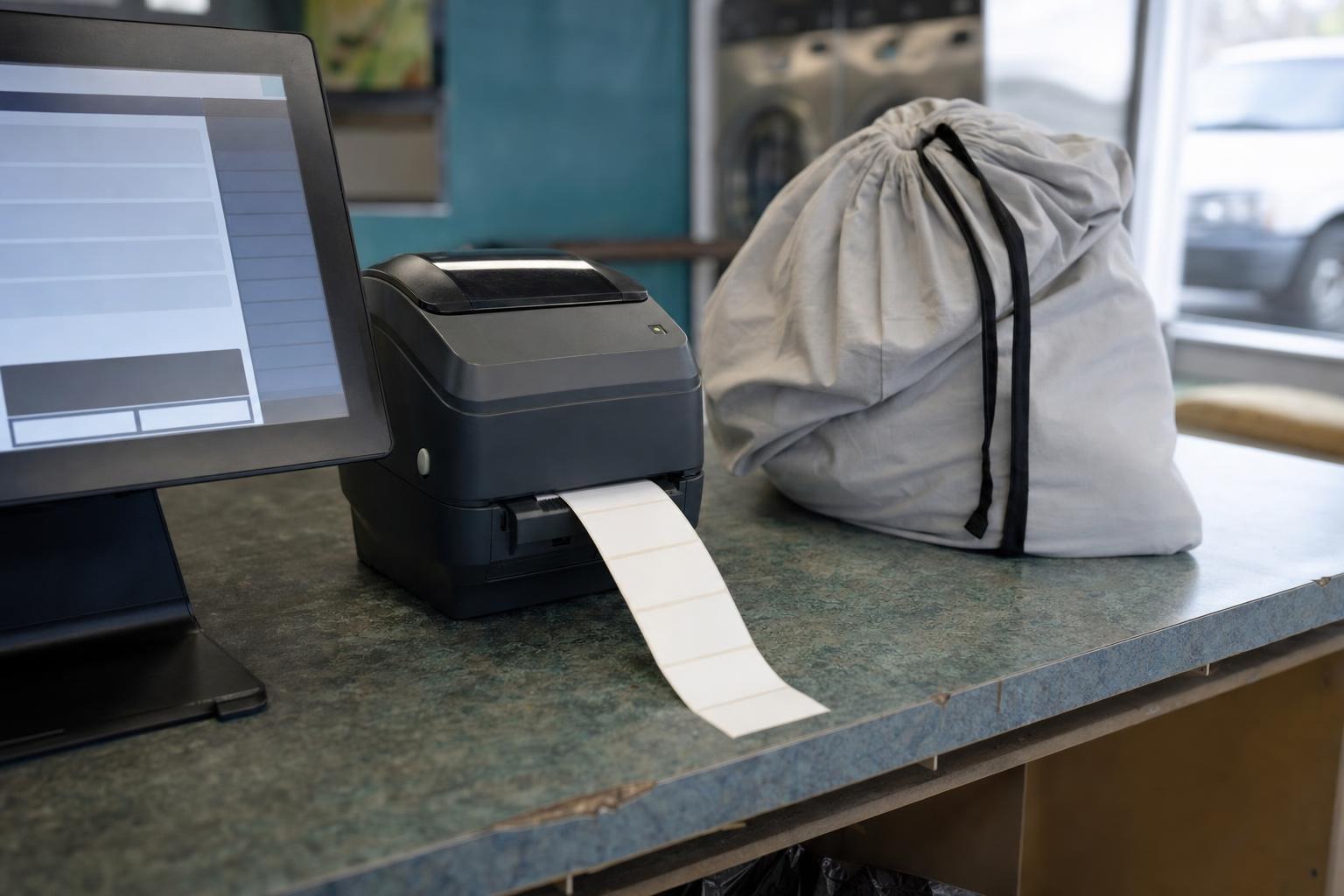
A POS exists because a bag of somebody else's clothing has to move through a building and come back out matched to the right person. That is a logistics problem before it is a payment problem. Weight has to be recorded, an order has to be created, the bag has to be findable at every stage between drop-off and collection, and whoever is on shift needs to know what to do next. Payment happens somewhere in that sequence, but it is one event inside a workflow rather than the point of the system.
Terminology causes most of the confusion here. Vendors and operators alike describe card readers as point-of-sale equipment, which is understandable given that a sale occurs at one. The distinction that matters is not where money moves but whether the software has any concept of an order, a task or a person doing work. A reader that authorizes a dryer knows nothing about who owns the clothes inside it. A POS is built entirely around that relationship. Shopping for one while comparing quotes for the other is how operators end up with a spreadsheet full of numbers that cannot be compared.
The taxonomy in this guide follows the framework published by LaundromatSoftware.com, which organizes the market on this split rather than lumping every product into one list.
The Difference in One Table
Laundromat Software Types
Before getting into hardware and software features, look at the product types more broadly. There are four, though the fourth is really an extension of the third.
1. Card Systems
Dedicated readers mounted at every washer and dryer, connected to a central kiosk or value-add center where customers load funds onto a card or account. The established names are FasCard and LaundryCard from Card Concepts, plus SpyderWash, Laundroworks and ESD.
Retrofit friendly: Built around adapting existing coin equipment rather than replacing it, which is why they dominate in stores not ready to change out a floor of washers.
No app required: Customers who will not download anything can still pay by card, which matters more in some neighborhoods than others.
Stored value encourages larger loads: Balances sit on an account, so customers tend to add more than one wash at a time.
Remote price control: ESD's MyLaundryLink, for example, supports online income and usage monitoring plus remote programming and price changes on compatible systems.
There are trade-offs worth weighing:
Hardware scales with machine count: You need a reader for every machine plus the central kiosk, so the scope of the project grows with the size of your floor.
Installation is real work: Network cabling or wireless bridges across the floor, and in some cases a new controller board inside the machine.
2. Mobile Payment Apps
The customer's phone replaces the card. A small module at each machine communicates with an app. PayRange, ShinePay and TangerPay lead here, with manufacturer entries like DexterPay and Speed Queen offering similar capability.
Minimal hardware: The module is smaller and simpler than a reader and kiosk setup, and the customer supplies the terminal.
Faster to deploy: Fewer parts to install across a floor of machines.
Different commercial model: These platforms are structured around ongoing service rather than an equipment build-out, which changes how you evaluate them against a card system. Speak to each vendor directly about terms.
The main downside is dependency. Customers without the app, or without a working phone at that moment, cannot pay. That is the trade for the simpler installation, and it is why plenty of stores run cards and app payment side by side.
3. Laundromat POS Systems
The counter system for stores that process laundry themselves. This is where the market gets genuinely varied.
CleanCloud is London-based with a large international user base, and Cents also owns Laundroworks, a self-serve card system. Wash-Dry-Fold POS and Turns are also established options, the latter owned by PayRange.
Order tracking: Follows each bag through sort, wash, dry, fold and pickup, so nobody has to remember where anything is.
Employee management: Roles, permissions and shift accountability, with time-clock correction on the fuller platforms.
Commercial invoicing: Handles recurring accounts and subscriptions, which spreadsheets stop coping with quickly.
Service-line reporting: Splits revenue and labor by service rather than lumping it together.
Delivery dispatch: Driver assignment, routes and delivery windows on most platforms.
The downside is that a POS only earns its place if your store actually performs laundry for customers. A self-serve-only laundromat is paying for a workflow it does not have.
4. Delivery Software
Pickup and delivery is sold as its own category, and the marketing is more separate than the software needs to be.
Consider what a delivery product has to do once an order exists. A driver collects a bag, and that bag then has to be weighed, priced, sorted, washed, dried, folded and staged for return, with somebody accountable at each step. Every one of those actions is a POS function. Strip them out and what remains is a routing tool, which solves the smallest part of the problem.
The pattern shows up in the vendors themselves. Curbside Laundries entered this market as a delivery product and added point-of-sale capability within roughly a year, which is the predictable outcome once you try to run pickup and delivery for a store that cannot process the orders arriving through it.
The comparison worth holding onto is a restaurant. A delivery app is useful because a kitchen exists behind it. Remove the kitchen and the app has nothing to dispatch. Laundry works the same way, and it makes no difference whether the bag arrives by van or by hand.
Laundromat Hardware Possibilities
Laundromat software combines hardware and software, and the hardware differs completely between the two categories. That difference is the clearest signal these are separate purchases.
For the payment layer:
- Card reader at each washer and dryer
- Central kiosk or value-add center for loading funds
- Network cabling or wireless bridges across the floor
- Machine control boards, where existing ones will not interface
- Mobile payment modules, if you go the app route
- Coin mechanisms retained during transition
For the counter:
- Touchscreen terminal or tablet
- Scale for weight-based pricing
- Label printer for bag tags
- Receipt printer
- Barcode scanner for stage tracking
- Cash drawer
Machine controls sit underneath everything. The board inside each washer and dryer determines what payment hardware can talk to it, which is why compatibility comes before vendor choice and not after.
Laundromat Software Possibilities
Software capability varies by category and by tier, and not every store needs the same feature set.
Machine activation: Authorizes payment and sends the start signal. This is the whole job on the self-serve side.
Stored-value accounts: Tracks customer balances, loyalty credits and refunds without staff involvement.
Revenue reporting by machine: Shows which units earn and which sit idle, which is how you decide what to replace. It is the same remote equipment monitoring principle that equipment-heavy industries have adopted more broadly, where sensors report wear and performance continuously so a failure is scheduled rather than discovered. A dryer that stops earning is telling you something several weeks before it stops running.
Remote pricing: Changes prices by machine, day or time of day without walking the floor.
Order intake and pricing: By weight or by item, on the POS side.
Stage tracking: Moves each order through sorting, washing, drying, folding and pickup with a visible status.
Employee roles and permissions: Controls who can discount, refund or void, and records who did what.
Commercial invoicing: Bills recurring accounts on terms rather than per visit.
Driver assignment and routing: Allocates pickups and deliveries into windows.
Integration between layers: CleanCloud, for instance, lists integrations with LaundryCard, FasCard, Laundroworks, Tangerpay and SpyderWash, plus app connections for supported Speed Queen and Huebsch systems.
What to Look for in Laundromat Software
The right answer depends on your store. A self-serve-only site in a dense neighborhood has different priorities from a full-service store running delivery routes. That said, five things are worth checking every time.
1. Machine Compatibility, First
Establish what your machines will accept before comparing platforms. This gates everything else and it determines whether you are looking at a straightforward upgrade or a much larger project.
Older coin machines vary enormously. Some accept a reader against the existing coin drop with no change to the machine.
Others need a new controller board, and a few will not take payment hardware at all without being replaced. Document the make, model and controller type for every unit before you take a single sales call, because a vendor working from your actual equipment list can tell you far more than one working from a description.
2. Payment Acceptance That Matches Your Customers
Confirm EMV and contactless support explicitly rather than assuming it. Tap-to-pay is now the default behavior for a large share of customers, and a system that handles chip but not contactless will feel dated to them within a year.
Ask what happens to coin customers during transition, because that decision is usually made too late. SpyderWash, for example, offers contact and contactless payment with web-based reporting while continuing to accept coins, and running both for a period tends to cost less than the custom you lose by cutting over abruptly.
3. Commercial Terms, Established Directly
The three product types are structured very differently as commercial arrangements, which is what catches first-time buyers comparing them side by side.
Most vendors in this category now handle terms through a consultation rather than publishing them, because the answer genuinely depends on your machine count, your service mix and your expected volume. Treat that as useful rather than evasive, and go in prepared.
Bring your equipment list, your current monthly volume and your realistic growth expectation to every conversation. Ask how the arrangement changes as you grow, whether there are usage thresholds, and what the exit looks like if you later switch systems.
Card processing sits underneath all three. Ask which processor the platform uses, whether rates are passed through or marked up, how chargebacks are handled and what happens if you change systems later.
4. A Real Order, Tested End to End
For POS platforms specifically, a demo will not expose the friction a real order does.
Run one through intake, stage tracking, payment, refund and pickup. If you deliver, test driver assignment too. Refunds and voids are where badly designed systems reveal themselves, because that is the workflow vendors rehearse least.
5. Security and Compliance Posture
PCI DSS v3.2.1 retired on 31 March 2024, and the future-dated requirements in v4.0 took effect on 31 March 2025. Ask each vendor how its readers, hosted payment pages and reports support your current obligations, and get the answer in writing.
Which One Does Your Store Need?
Forget brands for a moment and look at your own floor.
Walk the machines. If a customer can put money in and start a wash without speaking to anyone, you are already operating a self-serve payment layer. Coin is a payment system. It is simply the oldest one, and it has no reporting, no remote price control and no way to take a card. Choosing a card reader or an app is not adding a new category to your business, it is replacing the one you already run. That is why practically every laundromat buys here eventually, and why the question is which system rather than whether.
Then walk the counter. Is there a pile of other people's laundry behind it? If there is not, a POS has nothing to manage and no amount of feature comparison changes that. If there is, look at how it is currently tracked, which in most stores means a marker pen, a paper tag and somebody's memory. That is the system a POS replaces, and the cost of the software is really a comparison against the cost of the mistakes that method produces.
A third question decides your timing. If wash-dry-fold is something you are considering rather than something you do, buy the payment layer now and revisit the counter when the volume exists. Buying a POS ahead of demand means paying monthly for an empty workflow, and the platform you would choose for twenty bags a week is rarely the one you would choose for two hundred.
Once you know which category you are shopping in, compare inside it rather than across it. LaundromatSoftware.com maintains separate guides for laundromat POS platforms, card systems and mobile payment apps, each staying within one category on purpose so you are always comparing like with like.
FAQ
What is the difference between a self-serve card system and a laundromat POS?
A self-serve card system takes payment at the machine so customers can run their own laundry. A laundromat POS manages the laundry your staff performs for customers, covering orders, employees, invoicing and delivery. Most full-service stores run both.
How many types of laundromat software are there?
Four product types across two categories. Card systems and mobile payment apps both sit in the self-serve payment layer, laundromat POS is the second category, and delivery software is best understood as an extension of POS.
Do all laundromats need a POS system?
No. Only stores offering wash-dry-fold, commercial accounts or pickup and delivery need one. A self-serve-only laundromat needs the payment layer and nothing else.
Can one system do both jobs?
Some vendors sell products in both categories, Cents being the clearest example with its POS and the Laundroworks card system. They remain two products sold separately, because not every store needs both.
What hardware do I need for each?
Card systems need a reader at every machine plus a central kiosk and network cabling. Mobile apps need a small module per machine. A POS needs a terminal, scale, label printer, receipt printer, scanner and usually a cash drawer.
How do I find out what a system will cost my store?
Speak to the vendor directly. Requirements vary so widely by machine count, controller type, service mix and volume that a meaningful figure only comes from a consultation against your actual equipment list. Have that list, your current monthly volume and your growth expectation ready before the call.
Will a card system work with my existing machines?
Often, but not always. Card systems such as FasCard are designed to retrofit many existing coin machines, though older equipment may need a new controller board and some machines cannot be adapted at all.
Which should I buy first?
The payment system, in nearly every case. It is the baseline layer serving customers who do their own laundry. Add a POS when you introduce wash-dry-fold or delivery.
Getting the Category Right Before the Brand
Most bad laundromat software purchases start the same way, with a shopper comparing two products that were never in the same category.
Work out which layer you are buying first. Confirm what your machines will accept second. Then compare inside that category on the terms that matter for it: retrofit fit, installation scope and processing arrangements for payment systems, and order tracking, employee tools, delivery and reporting for a POS.
Do that in order and the shortlist narrows itself.