Setting Up IPTV for a Parent: A Guide for the Family Tech Support Person
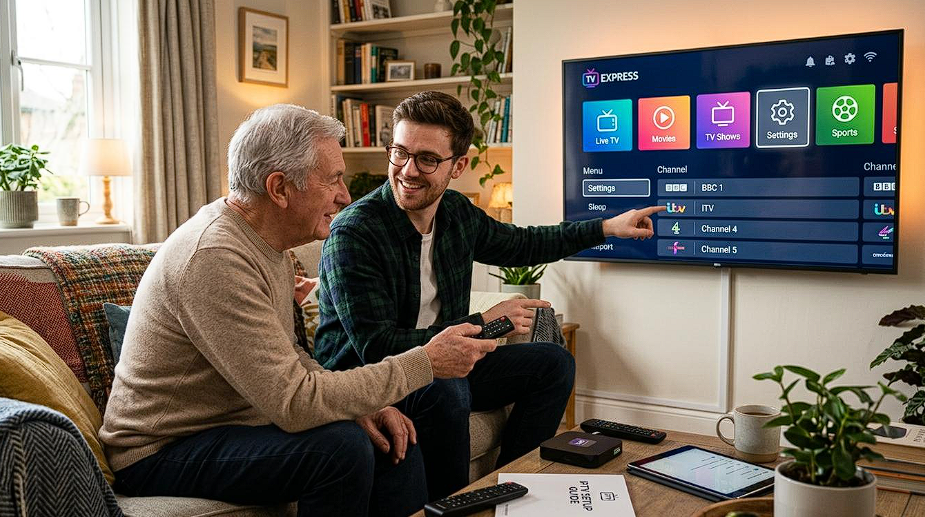
Every family has one. The person who gets the phone call that begins "the telly's doing that thing again."
If that's you, this guide is written for you rather than for them. Setting up streaming television for a parent or grandparent is not technically difficult. What makes it hard is that you won't be there when it goes wrong — and every decision you make during setup either creates future phone calls or prevents them.
That single constraint should drive everything. Not picture quality, not features, not what you would choose for yourself. Will this still work in six months, unattended?
Start with the honest question: is this actually the right move?
Worth asking before you spend a Saturday on it.
Good reasons to make the change:
They're paying a substantial monthly sum for a package where they watch a fraction of the channels. They've mentioned wanting something specific they can't get. They already stream comfortably and have simply outgrown what they have. Or — very common — a contract has ended and the price has quietly climbed. In these situations, exploring alternative streaming options such as Watz Me Now can help viewers find a service that better matches their current viewing needs
Reasons to pause:
Their broadband is genuinely poor and can't be improved. They're deeply attached to a specific interface and change genuinely distresses them. Or the request came from you rather than from them.
That last one deserves a moment. Enthusiasm for saving a relative money is a decent instinct, but if the current setup works and they're content with it, replacing it optimises your priorities, not theirs. Free is not free if it costs them their confidence with the television.
If they've asked, or if the money genuinely matters, proceed.
The one thing to establish first: how good is their broadband, really
Everything else depends on this, and you cannot assess it by asking. "It's fine" means "it hasn't stopped me doing what I currently do."
Go and check in person.
Test in the room where the television actually is — not by the router. Run a speed test there, on a device, at a normal evening hour rather than mid-morning.
What you need: roughly 8–15 Mbps stable for Full HD, 25 Mbps or more for 4K. But the figure matters less than the consistency. A steady 20 Mbps is more useful than an erratic 100 Mbps.
If the signal in the TV room is weak, you have three options, in order of preference: run a cable, move the router, or add a repeater. Do not skip to the repeater because it's easiest — a badly placed repeater rebroadcasts a weak signal and typically halves throughput, producing exactly the intermittent faults you'll be called about.
If their broadband genuinely can't support it — some rural connections still can't — stop here. No provider and no equipment fixes that, and installing anyway guarantees a difficult conversation later.
Choose the device for reliability, not specification
Your instinct will be to buy something good. Buy something boring instead.
What matters:
A simple remote. Few buttons, large ones, obvious functions. This is genuinely the single most important factor in whether the setup gets used, and it outranks every technical specification. A remote with forty tiny buttons and three of them doing something unexpected will not survive contact with someone who doesn't want to learn it.
An Ethernet port, if a cable is at all feasible. Wired connections remove an entire category of future phone calls.
Enough memory — 2 GB minimum. Below that, apps become slow and crash-prone over time, and "it's got slow" is a call you'll get.
Ongoing software updates, which in practice means a device from a manufacturer still supporting it.
What doesn't matter: core counts, storage capacity, 8K support, anything described as "gaming". None of it affects whether the television works next March.
A note on the television they already own. If it's a reasonably recent smart TV, it may handle this without any additional box — which is the best outcome available, because it means one remote instead of two. Two remotes is the most common reason a setup like this quietly stops being used. Check what their TV can run before buying anything.
One thing to avoid entirely: all-in-one boxes sold with a "lifetime subscription" included. The hardware is usually poor, and the subscription lasts exactly as long as the seller does. You'll be replacing it, and having the conversation about why.
Set it up so it survives without you
This is the part most people rush, and it's the part that determines whether you get phone calls.
Reduce everything to the fewest possible steps
Ideally: turn on the television, and the channels are there.
Configure the device to launch the app automatically on start-up if that option exists. Set the television's default input to the right HDMI port. Every step you eliminate is a step that can't go wrong.
Build the favourites list with them, not for them
Sit down together. Ask which channels they actually watch — you'll usually get a list of eight to fifteen.
Add those. Hide everything else.
This feels like you're withholding something. You aren't. A list of thousands of channels is not a feature for someone who wants the news at six and a film on Sunday; it's an obstacle. Someone who can find what they want in two button presses will use the service. Someone facing an endless scroll will drift back to whatever was there before.
Put their most-watched channel first. Small thing, disproportionate effect.
Handle the second remote problem
If you've added a box, they now have two remotes and one of them does nothing useful most of the time.
Best solution: if their television supports HDMI-CEC, enable it — the box's remote will then control the TV's power and volume, and the TV remote can go in a drawer.
Failing that: put a small label on each remote. Not a technical label. "TV" and "Channels".
Write the instructions down
On paper. Large print. Left near the television, not filed away.
Five lines maximum:
To watch TV: press the round button at the top.
To change channel: up and down arrows.
To see the list of channels: the button marked OK.
If the picture freezes: press the back button, then OK.
If nothing works: unplug the small black box at the wall, wait a minute, plug it back in.
That last line resolves most of the calls you would otherwise receive. Write it.
Test it as they will use it
Turn everything off at the wall. Leave the room. Come back and use it the way they will — from cold, with the paper instructions, and without touching a phone or a settings menu.
You'll find something. There's always something.
The half hour that actually matters
Show them, then let them do it.
Not a demonstration where you hold the remote and they watch. Hand it over. Ask them to put on the news. Then to find a film. Then to get back to the news.
Watch what they hesitate over. That hesitation is the design flaw, and you can fix it now — reorder the list, remove a step, change which channel is first — rather than hearing about it in a fortnight.
Do not explain how it works. They don't need to know what a stream is, what an app is, or where the channels come from, any more than they needed to know how an aerial worked. Explaining the mechanism is a thing we do for our own satisfaction. Keep it to what to press.
Set expectations honestly. Tell them the picture may occasionally pause for a few seconds and then carry on, and that this is normal and not something they've broken. Otherwise the first hiccup becomes a phone call and a conviction that they've damaged something.
Two UK IPTV services
Both offer around 30,000 channels and 150,000 films and series, from £24.99, across Android TV and boxes, streaming sticks, smart TVs, iOS, Windows and Mac — so the headline figures won't decide this for you.
For a setup like this, the specifications matter far less than two practical things: how quickly the service can be activated and reconfigured, and whether support is available when you're not the one in the room.
IPTVUK4K
IPTV UK emphasises picture quality and high-resolution delivery alongside its film and entertainment catalogue.
Relevant here mainly as a caution: high resolution is only an advantage when the connection and the device both support it comfortably. On a modest broadband line, a stable lower-resolution picture is unambiguously the better choice — and it's the one you should configure, whatever the service is capable of. Instant activation and seven-day support.
AtlasTV
British IPTV positions itself around everyday reliability for UK households rather than headline specifications.
That framing fits this use case well. What you want for a relative is not the highest capability but the most predictable behaviour — channels that start quickly, a guide that shows the right programme, and no surprises depending on the hour. Same catalogue scope, same pricing, same instant activation and seven-day support.
Being straight about it
These two services publish very similar catalogues at identical prices. Anyone claiming one carries substantially more than the other for the same money is describing a difference that doesn't exist.
For this particular job, choose on support responsiveness — because when something goes wrong, you'll be the one messaging them from another city.
How to test before committing
Test at their house, on their connection, on the device you're actually going to use. A trial that works beautifully at your flat proves nothing about theirs.
Test in the evening, when networks are busiest. That's when they watch.
Message support during the trial with any question at all. You're measuring how quickly a human replies, because that's the service you're really buying.
Start with a short subscription. A month tells you what a promise can't. Only extend once it's been quietly working for several weeks.
Handling support from a distance
You'll be doing this over the phone. Prepare for it now.
Photograph the setup. The back of the television, the box, the cables, which HDMI port. When they say "I've unplugged something," you'll be able to see what.
Note the credentials somewhere you can find them. Not on their television — in your own notes. You'll need them if the app has to be reinstalled.
Know the sequence you'll talk them through, because it's the same one every time:
Is the small box's light on?
Press the back button, then OK.
Unplug the box at the wall, count to sixty, plug it back in.
Unplug the router, count to sixty, plug it back in.
Four steps, in that order. They resolve the substantial majority of problems, and none of them require anyone to understand anything.
If it's still broken after those, it's a genuine fault and it's the provider's job. Which is exactly why you chose on support responsiveness.
What actually goes wrong, and what causes it
Picture freezes occasionally, otherwise fine. Normal for live streaming, especially at peak times. Reassurance, not repair.
Freezes constantly, every evening, always around the same time. Either local network congestion or the provider's capacity. If it's every night at eight without fail across all channels, it's the provider.
Worked for months, then stopped. Usually an expired subscription, occasionally an app update. Check the renewal date first — it's the answer more often than not.
"It's got slow." Typically a device short on memory, gradually filling up. A restart helps temporarily; more memory helps permanently.
Only the high-quality channels stutter. The device's decoder can't cope. Set it to a lower resolution and stop thinking about it.
Nothing at all, black screen. Nine times in ten, the television is on the wrong input. Ask what's in the corner of the screen before assuming anything worse.
The renewal problem — solve it now
This is the thing that catches families out.
Subscriptions expire. When they do, the television simply stops working, and your relative will have no idea why, and you'll get the phone call — usually at an inconvenient moment.
Do three things at setup:
Note the expiry date in your own calendar, with a reminder ten days beforehand.
Renew before it lapses, not after. Renewing an active subscription usually extends it seamlessly; letting it lapse can mean reconfiguring the device, which means another trip or another difficult phone call.
Keep the confirmation email. It contains the credentials you'll need if anything has to be reinstalled.
Ten minutes of admin at setup. It removes the single most predictable failure in the whole arrangement.
Frequently asked questions
Is this too complicated for an older relative?
Not if it's set up properly. Fifteen channels, one remote, automatic start-up. The complexity is in the setup, and that's your job, not theirs.
Do they need fast broadband?
Around 8–15 Mbps stable for Full HD. Stability matters far more than the headline speed.
Can they keep watching normal television as well?
Yes. Freeview through the aerial continues to work independently. Many households keep both, at least initially, and there's no reason to remove the aerial.
How many screens can they use at once?
Depends on the plan's simultaneous stream allowance. For a single household with one main television, it's rarely a constraint.
What if they don't get on with it?
Start with a monthly subscription and keep the existing setup running for the first month. It costs slightly more briefly and removes all the pressure.
Do they still need a TV Licence?
Yes — if they watch or record live television on any device, however it reaches them. This doesn't change that.
A note on VPNs and the legal position
VPNs. Legal in the UK and useful in specific situations — on public networks, or as a diagnostic tool. For a home setup like this one, a VPN adds a layer of complexity and a small performance cost for no benefit, and something extra to go wrong when you're not there. Leave it out.
The legal framework. Two separate questions often get merged. The technology is legal: IPTV is a delivery method, the same one mainstream broadband TV services use. The question that matters concerns content and the broadcasting rights attached to it, negotiated territory by territory — a service needs the corresponding rights for what it distributes.
Two habits follow, and they're worth applying on a relative's behalf: favour providers with accessible legal pages, clear terms and traceable payment methods; and treat implausible claims sceptically. "Everything in 4K" is technically impossible, since a channel not produced in Ultra HD cannot be delivered in it.
Separately: a TV Licence is required to watch or record live television in the UK on any device, regardless of how the signal arrives.
It remains each user's responsibility to ensure they hold the necessary rights to access content in their country of residence. This article is informational and does not constitute legal advice.
Conclusion
The technical part of this takes an afternoon. The part that determines whether it lasts takes about an extra hour — and it's all the unglamorous work.
Check the broadband in the right room, at the right time of day. Buy a boring device with a simple remote. Cut the channel list down to what they actually watch. Get it to one remote if you possibly can. Write five lines on a piece of paper and leave them by the television. Put the renewal date in your calendar.
Do that, and the phone stops ringing. Which, for both of you, is the entire point.

.jpg)