What Is Remote Access and Why Retail Teams Are Adopting It

One in three retail workers in the United States still shows up for a shift without a dedicated device to do their job. That gap alone explains why so many store operators are rethinking how their teams stay connected.
Retail chains run on dozens, sometimes hundreds, of scattered locations, and every register, back office computer, and security camera needs attention at some point. Sending a technician to each site is slow and expensive.
Remote access closes that distance. It lets a manager, a support technician, or an approved employee reach a store system from anywhere with an internet connection. Here is what that shift actually means for retail operations.
Key Takeaways
- Remote access lets managers and IT staff reach registers, back office systems, and files from any location.
- Retail chains use it to cut technician travel time and resolve store issues in minutes rather than days.
- Role based permissions and multi factor authentication keep store data protected during remote sessions.
- Market researchers expect global spending on this technology to nearly triple by 2031.
- Teams that adopt remote tools report faster onboarding and steadier operations across multiple stores.
What Remote Access Means for Retail Teams
Remote access is technology that lets a person connect to and control a computer, server, or device from a different physical location using an internet connection. Instead of walking over to a register or a back office machine, an authorized user reaches it through software running on a laptop, tablet, or phone.
For retail businesses, remote access for business teams gives store managers, IT staff, and support teams a practical way to reach checkout terminals, security equipment, and shared drives without traveling between locations.
Retail teams often use two related but distinct tools. Remote desktop software mirrors a single machine's screen for one session. Remote access platforms go further, letting IT staff manage many devices, push updates, and monitor systems across an entire store network at once.
Why Retail Teams Are Turning to Remote Access
Retail teams operate under constant pressure to keep every location running the same way, whether a store has three staff or thirty. That pressure sits alongside wider technology shifts already reshaping retail and other industries, and remote access has become one of the more practical responses to it.
Key Stat: The global remote access software market is on track to grow from $2.60 billion in 2024 to $8.65 billion by 2031, a 19.4% annual growth rate, according to The Insight Partners.
Distributed, Multi Location Operations
A single retail brand might run stores across several states or countries, each with its own registers, network gear, and software versions.
Keeping systems consistent across that many sites used to mean flying a technician from location to location for routine fixes. Remote access removes that requirement almost entirely, letting one support desk cover an entire region.
Add a new location and every one of those systems needs the same setup, the same security rules, and someone who can step in the moment something goes wrong. A centralized remote connection makes that far easier to standardize than sending a different contractor to every address.
Frontline Technology Gaps
Many retail employees still work without the tools they need to do their jobs efficiently. A 2024 frontline retail workforce study found real gaps in device access across the industry.
About 7.7 million retail employees, roughly 33% of the US retail workforce, lack a dedicated mobile device, and 40% of staff at large retailers either share one or go without entirely.
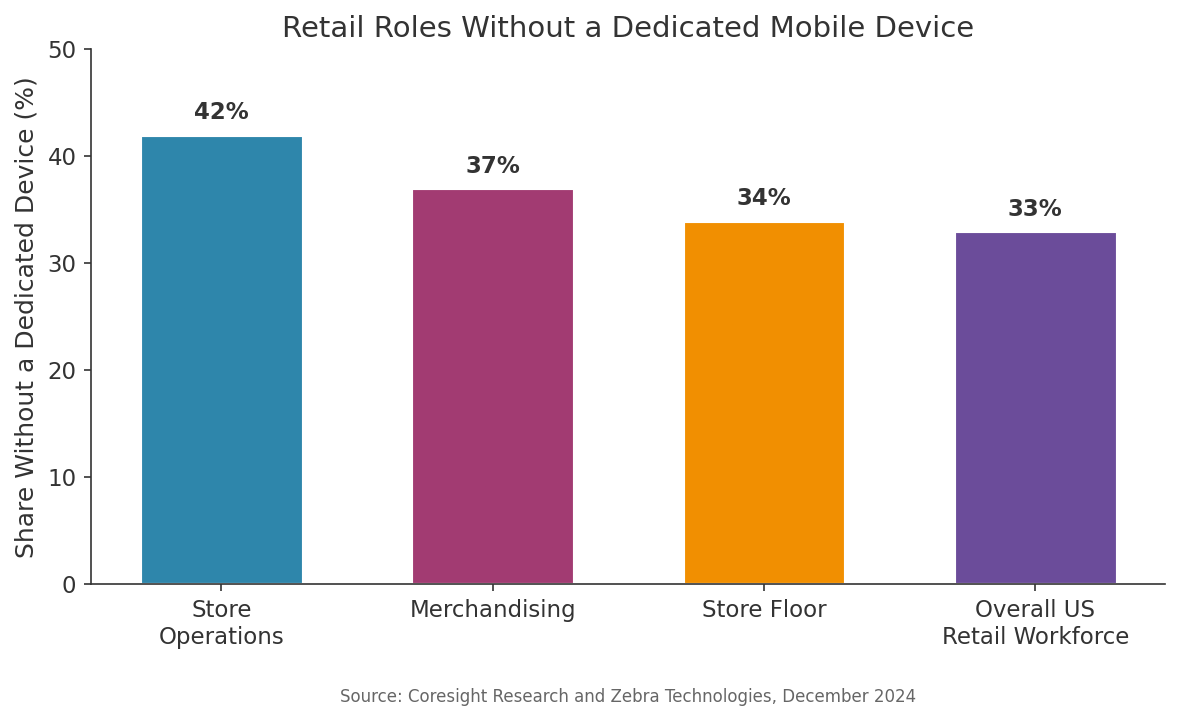
Figure 1: Retail roles without a dedicated mobile device, by department.
Store operations, merchandising, and store floor roles feel this gap most. It shows up as slower restocking, delayed customer responses, and managers stuck answering basic tech questions that remote support could resolve in minutes.
"Millions of retail employees nationwide still lack a device of their own for daily work."
Faster IT Support Without Site Visits
When something breaks on a Saturday afternoon, waiting for a technician to arrive is rarely an option.
Remote access lets a support desk log into the affected device right away, diagnose the fault, and often fix it before a customer notices anything went wrong.
Pro Tip: Give store managers a short, documented list of what remote support can and cannot touch. It speeds up approvals and keeps staff comfortable with the process.
Core Benefits of Remote Access for Retail Operations
Retail operations gain measurable ground once remote access becomes part of daily workflow rather than an emergency fallback.
- Lower travel and labor costs for IT support
- Faster resolution of everyday technical issues
- Consistent software versions across every location
- Clearer visibility into how store systems are performing
Retailers using remote support also need far fewer repeat technician visits, since problems tend to get diagnosed and fixed properly the first time.
This mirrors what separates thriving retail brands from stalled ones. How fast growing ecommerce brands scale their operations often comes down to whether the back end technology can keep pace with store level demand.
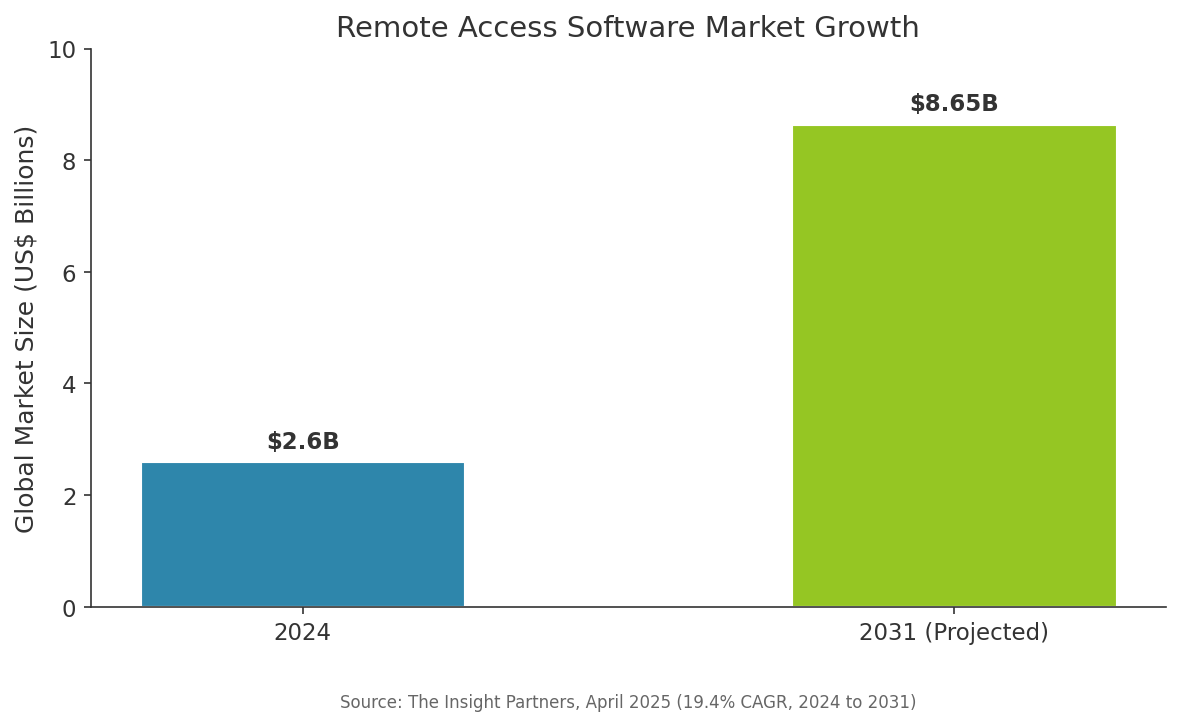
Figure 2: Global remote access software market, 2024 versus projected 2031.
Security Considerations for Retail Remote Access
Security has to move in step with convenience whenever a new access point opens into store systems.
Zero trust network access principles explain the security model retailers should expect from any remote setup: every user and device gets verified each time they connect, rather than being trusted once they are inside the network.
Multi factor authentication, encrypted sessions, and detailed access logs are the baseline for any retailer opening up remote connections to store registers or customer data.
"A store's payment systems and customer data deserve the same access controls as a bank vault, not an unlocked back door."
Note: Review remote access permissions every time an employee changes roles or leaves the company. Forgotten accounts are one of the easiest ways a system gets exposed.
Retailers should also decide who can approve new access requests, and how often those permissions get reviewed, before rolling the system out to every location. A short written policy covering these decisions saves confusion later, especially once several stores and multiple support staff are involved.
How Retail Teams Can Roll Out Remote Access Successfully
Rolling out remote access works best as a phased process rather than a single switch flip.
- Audit every system that might need remote reach, including registers, back office computers, security cameras, and network hardware.
- Assign role based permissions so each person can only reach what their job actually requires.
- Turn on multi factor authentication before any account goes live, along with device verification.
- Train store managers and staff on basic remote troubleshooting steps so simple issues get flagged correctly.
- Review session logs regularly and remove access for anyone who has changed roles or left the company.
The same groundwork applies to any distributed workforce, not just retail floors. Building a reliable system for managing distributed teams walks through how one operations team built theirs from scratch.
FAQs
What is remote access in simple terms?
Remote access is software that lets someone reach a computer or device somewhere else over the internet, viewing and controlling it as if they were sitting right in front of it. Retail teams use it to manage registers and back office systems from anywhere.
Is remote access safe for point of sale systems?
Yes, when set up correctly. Look for encrypted connections, multi factor authentication, and detailed session logs. Limiting each account to only the systems it needs, known as role based access, further reduces risk for payment terminals and customer data.
How is remote access different from remote desktop software?
Remote desktop tools usually give access to one machine during a single session. A remote access platform covers many devices at once across every store, often adding centralized monitoring, patching, and permission controls into one dashboard.
Can small retail chains use remote access, or is it only for large enterprises?
Small chains benefit too. A three store operation faces the same travel delays and device gaps as a larger one, just at a smaller scale, and most remote access tools scale down in cost and complexity to match.
Does remote access require a dedicated IT team?
No. Many retailers assign remote access management to a single operations manager or an outsourced IT provider. The software handles the heavy lifting, while a small team sets permissions, reviews activity, and handles occasional support requests.
What should retailers look for in a remote access solution?
Prioritize strong encryption, layered authentication, detailed session logs, and support for the devices already in stores. Ease of use for non technical staff matters too, since store managers often handle basic troubleshooting themselves.
Conclusion
Retail has always been a business of many small locations acting as one brand, and that only works when systems stay connected.
Remote access helps store leaders and IT teams close that distance quickly, fixing problems fast and keeping every register and back office system operating consistently.
This shift sits alongside other changes already reshaping retail, including the growing role of AI ready knowledge in business search.
For teams still weighing the switch, the device gaps and travel costs already being felt across the industry make a strong case for starting now.
References
The Insight Partners, Remote Access Solution Market Size Worth $8.65 Billion by 2031, April 2025, https://www.globenewswire.com/news-release/2025/04/04/3055813/0/en/Remote-Access-Solution-Market-Size-Worth-8-65-Billion-by-2031-at-19-4-CAGR-Globally-Exclusive-Report-by-The-Insight-Partners.html
Coresight Research and Zebra Technologies, Success at Hand: Equipping Frontline Workers with More Mobile Devices, December 2024, https://www.businesswire.com/news/home/20241203041302/en/New-U.S.-Report-One-in-Three-Retail-Associates-Lack-Individual-Mobile-Devices
Fact Check: All statistics and data points in this article were verified against original sources as of September 8, 2026. Sources are listed in the References section.