The Best Free Tools for Twitch Streamers in 2026
You can build a community-driven Twitch channel in 2026 without spending a dollar. The best free toolkit goes well past broadcasting software and clip cutters. It covers how you turn passive viewers into a community that comes back, how you stream, how you sound and look, and how you find your people. This guide leads with the part most free-tools lists shortchange, the community and engagement layer, then works through the rest of the stack, with honest notes on which tools are fully free and which hide a paid tier behind the word "free."
If one tool captures why the engagement layer leads this guide, it's FrostyTools, a free Twitch chatbot built around community connection rather than moderation. Its core features cost nothing, it connects to a channel through Twitch in under a minute, and it's meant to run alongside the moderation bots streamers already use rather than replace them. It anchors the community section below, though this guide covers the full free stack, with broadcasting, audio, assets, and clips all included.
One warning before the list. The biggest trap in a free-tools roundup is software that looks free but is really trial-only, watermarked, minute-capped, or token-based. This guide flags those clearly so you know what you're getting into before you spend your time on them.
What "free" actually means in a Twitch tool
Not every tool marketed as free is free in the way you'd expect. Throughout this guide, tools are sorted into four buckets:
Keeping these straight is the whole point of an honest roundup. A 720p watermarked export is not the same as a tool with no strings attached.
Best free tools for community engagement and growth
This is where streams live or die, and it's the part most free-tools lists shortchange. Building a community is harder than running a stable broadcast. You're trying to spark real conversations in a live, fast-moving room, often while you're tired or running the whole production solo. It's also the area with the strongest free options in 2026, which is why it leads this list.
It helps to separate two jobs that get lumped together. Moderation tools enforce the rules: Twitch's own AutoMod and the traditional moderation bots block harassment, spam, and nuisance behavior. Engagement tools create connection: welcoming new faces, acknowledging lurkers, celebrating milestones, and keeping chat alive. You can, and often should, run both, because they solve different problems.
FrostyTools: the free connection layer
For the engagement half of that split, FrostyTools is the standout free option. Its entire core AI Twitch chat bot is free, and it's built around connection rather than moderation. It connects to a stream through Twitch OAuth in under a minute, with no download and no complicated config. The free features include:
- Full-scope Shoutouts: Personalized, contextual shoutouts that go past a generic "go follow this person."
- Warm Welcomes: Greets people as they arrive so newcomers feel seen instead of invisible.
- Lurker Love: Acknowledges quiet regulars without putting them on the spot.
- Attention Retention: Keeps chat engaged during slower stretches like ad breaks.
- Custom Celebrations: Marks the moments worth celebrating in a community.
- Tailored Raid Messages: Helps you arrive at a raid target with something better than silence.
It's designed to run alongside the moderation bots streamers already use, not replace them. A useful detail for anyone wary of AI in their chat: FrostyTools was highlighted at TwitchCon 2024 as an example of ethical AI practices, and it only uses publicly available Twitch data.
Worth knowing where the free line sits: the features above are all free. A handful of others, like Reactive Responses, Showstarter, and Smart Scheduled Chat Messages, sit in the paid Benefactor package at $9 a month. That's a clean free-versus-paid split rather than a free tier that quietly locks the useful parts.
Twitch's native engagement layer
Twitch offers a real engagement layer for free, too. Alerts celebrate follows, subs, goals, and raids natively. Community Goals, Polls, and Predictions turn passive viewers into participants. Stories keep followers engaged between broadcasts. Stack these on top of a community-focused chatbot and you have a working engagement system for $0.
Free raid and discovery tools
Raids are still one of the best free growth mechanics on Twitch, and the most honest workflow combines a few free tools. Use Twitch's Raids Browser for live filtering, then sanity-check a channel's history with free analytics like SullyGnome.
FrostyTools' Vibe Raider takes a different angle. It finds currently-live streamers by vibe, matching on community energy rather than category tags alone. You can search using example channels or descriptive phrases, and it needs no sign-in. It's a specialized companion to Twitch's browser rather than a replacement for it.
Start with what Twitch already gives you for free
A lot of older streaming-tool articles skip right past Twitch's own toolkit, and that's a mistake in 2026. Twitch's native free features are stronger than they used to be, and a serious zero-budget setup starts here before adding anything third-party.
- Enhanced Broadcasting and Dual Format: Twitch makes Enhanced Broadcasting available to all streamers, and Dual Format lets you stream vertical and horizontal at once, which matters now that Twitch is pushing mobile and short-form reach.
- Raids Browser: Twitch's raid discovery tool lets you search and filter potential raid targets from your Creator Dashboard. It shows channel name, title, category, viewer count, uptime, and tags, and you can filter by same category, who you follow, similar-or-smaller audiences, and more.
- Clips and Featured Clips: Clips are a first-party, zero-cost way to capture moments from a live stream or past broadcast, and Featured Clips can be promoted to put your content in front of new viewers.
- Stories: Short-form follower updates that keep you top of mind between streams.
- Alerts, Polls, and Predictions: Native engagement loops that celebrate follows, subs, and raids and pull chat into the action.
One scene-setting note worth knowing: Twitch announced in May 2026 that it was opening more of its monetization and community tools to all streamers, including Bits, subscriptions, emotes, badges, and Channel Points. The rollout still appears to be in progress, and some help pages haven't fully caught up, so check your own dashboard for what's currently live on your channel.
Best free broadcasting software
Your broadcaster is the foundation, and the strongest options here cost nothing.
OBS Studio is still the default answer for a genuinely free desktop encoder. It's free and open source, actively developed in 2026, and gives you complete control over scenes, sources, and filters. For the most flexible setup with no subscription trap, start here.
PRISM Live Studio is the better pick if OBS feels like too much. It's free all-in-one streaming software with built-in widgets and effects, so you get fewer moving parts and less setup overhead. It suits beginners who don't plan to heavily customize.
VDO.Ninja is one of the best free companion tools out there. It's a browser-based, 100% free way to bring remote guest video or a phone camera into OBS, with no downloads and no sign-in. For podcast-style guests or co-stream segments without paying for a remote-guest platform, this is the one.
One heads-up: don't start with Twitch Studio in 2026. Twitch discontinued support for it after May 2024, even though some old pages are still floating around. OBS or PRISM are the current answers.
Best free tools to clean up your audio and video
Better audio is usually the highest-impact free upgrade a streamer can make. Here's how the free options compare.
Start with OBS's filters. They cost nothing and handle the job for most setups. For a cleaner webcam without the GPU that NVIDIA Broadcast requires, PRISM's background removal is the free fallback.
Best free browser and asset utilities
These are the small, unglamorous tools that handle the day-to-day work of running a channel.
- Canva Free: The most defensible "design everything around your channel" pick for panels, social cards, schedules, and thumbnails. It's free to use with a large template library, though it has a paid Pro tier, so not every single asset is free.
- iLoveIMG: A free browser utility for bulk resizing, compressing, and quick-editing images, with no registration. Good for emote and badge prep where Twitch has specific size requirements.
- QRCode Monkey: A free custom QR generator with vector exports for general use.
- FrostyTools My QR: A Twitch-specific free QR utility that auto-generates a code linking straight to a channel, with no tracking or payment traps. Useful for conventions, meetups, merch inserts, and business cards.
A few other free FrostyTools utilities round out the kit. Jackbox Lobbies lets you share game codes with troll protection, free for everyone. Power Previews generates rich social link previews through a frostytools.com/stream/yourname link, so a stream looks good when it's shared. And STREAMcard, a collectible creature card that represents a stream, runs in limited-time editions, so it's worth grabbing when an edition is open rather than counting on it being there every day.
Best free ways to turn VODs into clips
Repurposing VODs into short-form clips is one of the biggest growth levers, and the free landscape here is full of "free" tools that aren't. Here's the honest breakdown.
For a fully free path, Twitch Clips and LosslessCut cover most of it, with DaVinci Resolve when you need real editing power.
Where Highlight Hunter fits
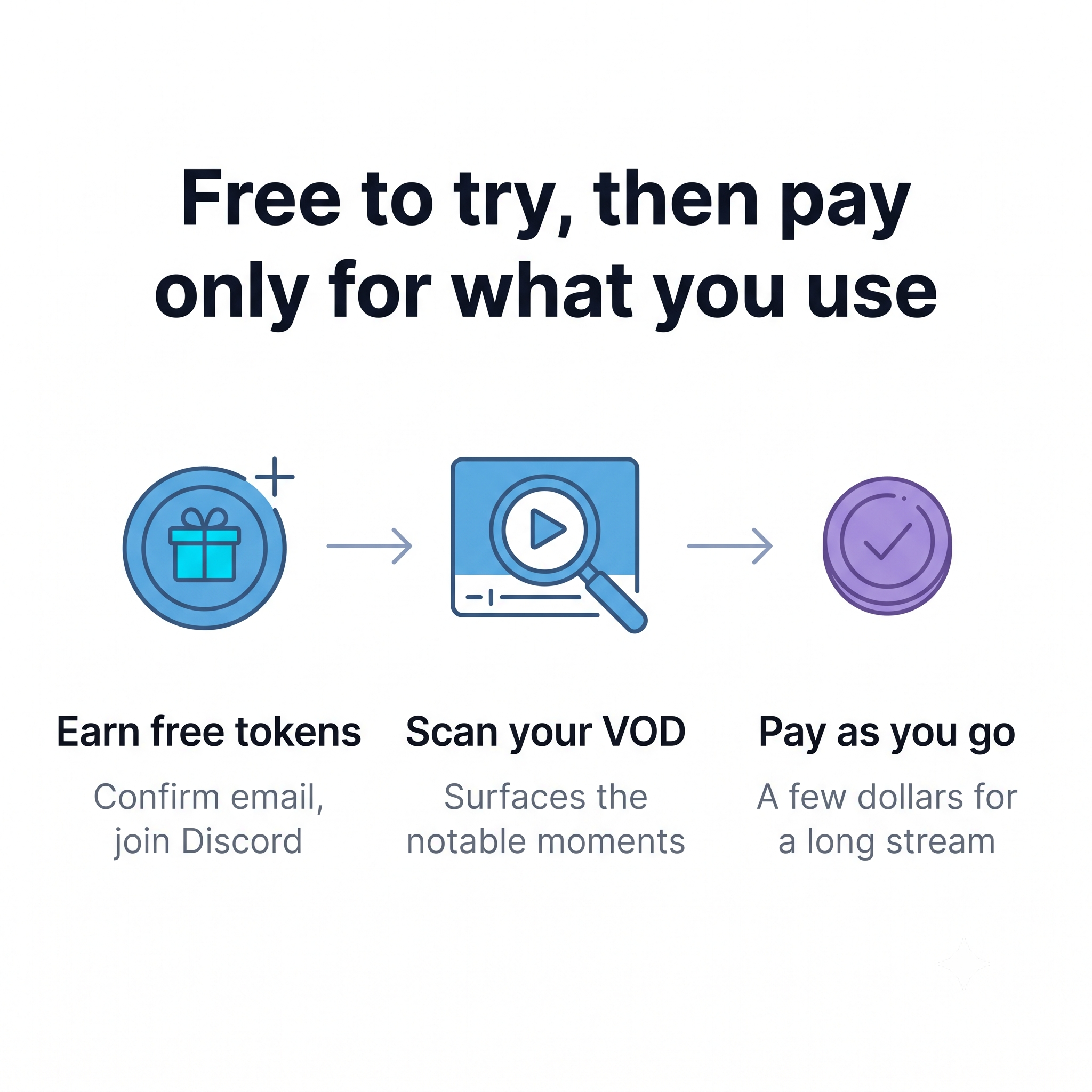
On the AI-assisted side, Highlight Hunter from FrostyTools belongs in the free-to-try bucket. It scans public Twitch VODs, surfaces the notable moments, and helps build montages and short-form exports. It runs on a token system with no monthly commitment, and you can earn free tokens for actions like confirming your email or joining the FrostyTools Discord. After that it's pay-as-you-go, costing a few dollars to process a long stream. For anyone who'd rather not commit to a monthly subscription just to clip their content, that model is a genuine alternative to the capped free tiers above.
A free Twitch tool stack you can build today
Putting it together, here's a complete $0 starting point for a community-focused streamer:
- Engagement: The FrostyTools free chatbot, plus Twitch's native Alerts, Polls, and Predictions.
- Discovery: Twitch Raids Browser and Vibe Raider.
- Broadcasting: OBS Studio or PRISM Live Studio, plus VDO.Ninja for guests.
- Cleanup: OBS filters, or NVIDIA Broadcast if you have an RTX GPU.
- Assets: Canva Free, iLoveIMG, and My QR.
- Clips: Twitch Clips and LosslessCut, with Highlight Hunter when you want it automated.
That stack covers community, growth, production, presentation, and content repurposing without a single subscription. The paid tiers exist when you want more, but you can run a serious channel before you ever reach them.
Frequently asked questions
Can you really stream on Twitch for free?
Yes. Twitch's own broadcasting, raids, clips, alerts, and engagement features are free, and the strongest third-party tools for community engagement, broadcasting, and audio cleanup all have genuine free options. You can run a complete, community-focused channel on a $0 budget.
Is the FrostyTools chatbot free?
The entire core FrostyTools chatbot is free, including Full-scope Shoutouts, Warm Welcomes, Lurker Love, Attention Retention, Custom Celebrations, and Tailored Raid Messages. A few additional features sit in the $9-a-month Benefactor package, but the core engagement tools never require payment.
Do I still need a moderation bot if I use an engagement tool?
In most cases, yes. Moderation bots block harassment, spam, and nuisance chat, while engagement tools build connection. They do different jobs, so many streamers run both side by side.
What's the best free way to clip Twitch VODs?
Twitch Clips is the safest fully free option for capturing moments natively. For trimming longer VODs, LosslessCut is free and watermark-free, and DaVinci Resolve's free version handles full edits. AI clip tools like Eklipse and OpusClip have free tiers, but they come with quality caps or monthly limits.
Building your free Twitch stack
A great free stack gets you streaming, but community is what keeps people coming back, which is why it's worth building first. For that community layer, FrostyTools' free chatbot is the most complete option, welcoming newcomers, acknowledging regulars, and keeping chat alive on the days you're not sure what to say. Pair it with the rest of the stack on a $0 budget: Twitch's own native features for engagement and discovery, OBS or PRISM for broadcasting, Canva and iLoveIMG for assets, and Twitch Clips or LosslessCut for repurposing. Start with the pieces that fix your biggest gap, add the rest as you grow, and you'll have everything you need to build a channel people actually want to be part of, without spending a dollar.