Ultiself refund and chargeback: how to get your money back
Sponsored content. For general information only, current as of November 2026. Not legal or financial advice. All payments, cancellations and refunds are governed solely by the Ultiself Terms of Use and Refund Policy in effect at the time of your request, which prevail over this article. Nothing here creates, waives or limits any rights or obligations under those documents or applicable law.
An unexpected Ultiself charge or a plan you no longer use usually raises two questions. How do you get the money back, and how do you stop the next payment? In most cases, contacting Ultiself billing support first is the most direct way to handle both, because the request goes straight to the team that manages your plan and payments.
This guide explains where to send your request, what to include in it, how long each stage takes, and how a chargeback works if you decide to dispute a charge with your bank.
How the Ultiself refund policy works
Ultiself works on an auto-renewing subscription, and four rules apply to every refund request.
- The refund window is 30 days. Under the Ultiself Terms of Use, you can request a refund within 30 days of your first purchase, and each request is reviewed individually.
- Cancelling and refunding are separate. Cancelling stops future renewals, while a refund returns money already paid, so ask for both in one email.
- Premium access and courses are billed separately, so your bank statement may show more than one Ultiself payment. If you’d like a refund for any of them, list each payment in your request.
Later requests are still reviewed. Requests made after 30 days fall outside the standard window, but billing support reviews them individually.
How to request an Ultiself refund
The most direct way to resolve an Ultiself billing question, such as a refund, a cancellation or an unfamiliar charge, is to email billing@ultiself.com. This dedicated address goes straight to the team that handles billing, and including all the details from the start saves you a round of follow-up questions.
If you bought your plan on the Ultiself website, for example after following an ad or a link, Ultiself bills you directly and the refund is requested with one email.
- Write to billing@ultiself.com from the email address you used to sign up.
- Ask to cancel your plan and refund the payment.
- Add as many purchase details as you can, such as a payment confirmation or a screenshot of the Ultiself charge from your bank statement.
- Wait for the automatic reply, which confirms that billing support will respond within 24 hours.
Reviewing a request usually takes a few business days. Each case is handled individually under the Ultiself refund policy, and once a refund is approved, the money reaches your card or PayPal within up to 10 business days after all processing stages are complete, depending on your bank.
How to find the Ultiself charge on your bank statement
Depending on the payment processor and your country, an Ultiself payment can appear on your bank statement as ultiself.com, SGT*ultiself.com, SG*Ultiself App, ULTISELF*Ultiself App, DLO*ULTISELFAPP, ULTISELF or Ultiself Corp.
Routines and packages, such as Productivity Formula, Self Upgrade System, Solid Mindset System or 4012 Challenge, show under their own names. Several charges on the same day therefore usually mean a plan plus a routine or package.
What users say about Ultiself billing support
Trustpilot is one of the places where Ultiself users share how their billing questions were resolved. The screenshot below shows a review from a user in Australia.
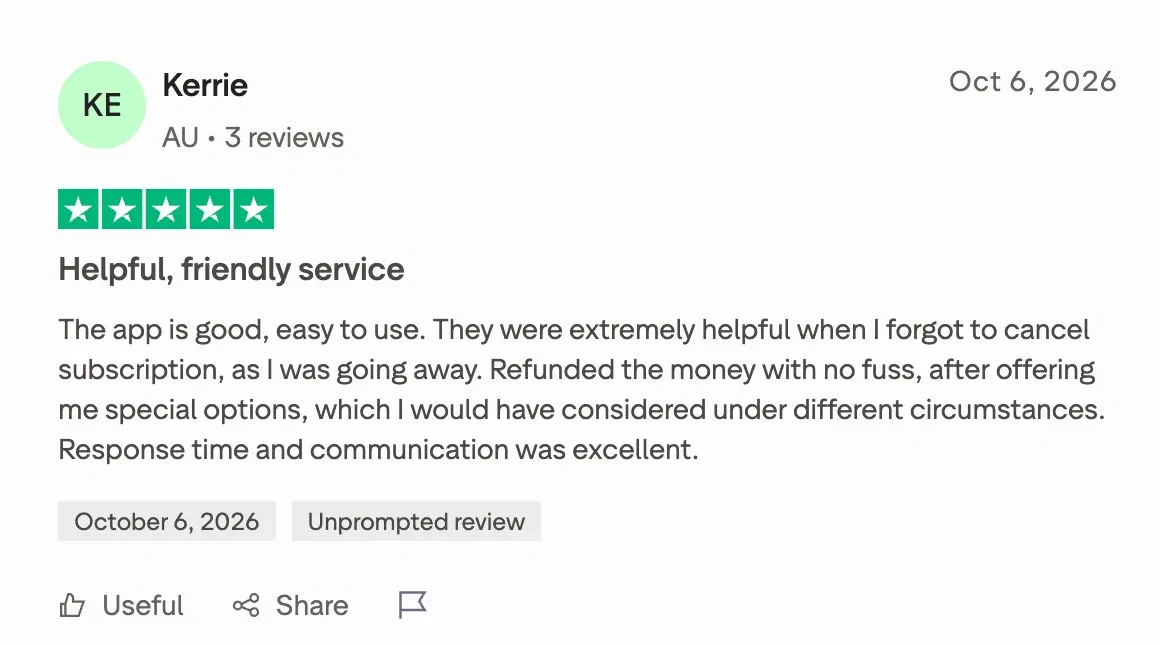
She rated her experience 5 out of 5, called the team “extremely helpful” and praised the response time and communication. She also mentioned that she finds the app good and easy to use.
Experiences like this show that billing questions are usually resolved fastest through direct contact with billing support.
What an Ultiself chargeback is and how it works
A chargeback is a request to your bank or card provider to reverse a card payment you dispute. The bank reviews your claim, may ask both you and Ultiself for supporting information, and decides whether to reverse the payment.
The process follows the bank’s dispute procedures rather than Ultiself’s refund policy, so requirements and outcomes may vary depending on your bank and individual circumstances. You have the right to dispute a charge with your bank, and this guide is not legal advice.
Refund or chargeback: what to consider
A chargeback is a legitimate way to dispute a payment. If you'd like to try the direct route first, here is how the two compare:
- A refund request goes straight to billing support, which can see your plan and payment history. A chargeback is handled by your bank under its own procedures and timelines.
- A bank investigation goes through several formal stages, while billing support usually reviews a refund request within a few business days.
- Once a dispute is opened, billing support can no longer refund that payment directly, because the case stays with the bank until it decides.
- A chargeback doesn’t cancel your plan, so future renewals can still be charged unless you cancel separately.
A refund avoids all of this: one email covers both the cancellation and the refund, and no bank investigation is needed.
Conclusion
In most cases, the most direct way to get your money back for an Ultiself payment is the official refund process. Cancel your plan, request the refund within 30 days of the first purchase and include as many purchase details as you can.
For any billing question, from refunds and cancellations to unfamiliar charges, write to billing@ultiself.com . Emails sent there go straight to a dedicated team that handles billing questions.
FAQ
Can I get a refund from Ultiself?
Under the Ultiself Terms of Use, you can request a refund within 30 days of your first purchase. Email billing@ultiself.com from the address you used to sign up and ask to cancel your plan and refund the payment. Requests made after this period are reviewed individually. If you subscribed through the App Store or Google Play, see the section above.
How long does an Ultiself refund take?
Reviewing a request usually takes a few business days. Once the refund is approved, the money reaches your card or PayPal within up to 10 business days, depending on your bank.
Does cancelling my Ultiself subscription refund my last payment?
No. Cancelling only stops future renewals. To get money back for a payment you’ve already made, ask for a refund in the same email as your cancellation request.
Can I still get a refund after opening a chargeback?
No. Once a chargeback is opened, a refund can no longer be requested through Ultiself billing support, and the outcome of that payment depends only on the bank’s decision. That is why it’s best to contact billing support before turning to your bank.
What should I do if I don’t recognise an Ultiself charge?
Check your bank statement for names such as ultiself.com, SG*Ultiself App or ULTISELF, and look for routines or packages billed on the same day. If the charge is still unclear, email billing@ultiself.com with its date and amount, and the billing team will look into it.